So what is CNC machining in practice? Most explanations describe the machine. This guide follows a part instead. It starts with the drawing you send and ends with the inspected part in a box, so you can see what happens at each stage and what each stage needs from you.
What CNC machining means
CNC stands for computer numerical control. A CNC machine is a machine tool, such as a mill, whose movements are controlled by numbers in a program rather than by hand wheels turned by an operator.
The “numerical control” part is older than computers on the shop floor. John T. Parsons developed numerical control for machine tools and was granted US Patent 2,820,187 for it; he was inducted into the National Inventors Hall of Fame in 1993 (National Inventors Hall of Fame). Early machines read their instructions from punched tape. Today a computer on the machine, the controller, reads a program file and drives motors on each axis.
Machining is the subtractive part. You start with more metal than you need, usually a bar, block or plate called stock, and cut away everything that isn’t the part. That’s the opposite of additive processes like 3D printing, which build a part up layer by layer.
Three words come up constantly:
- Axis: a direction the machine can move in. X, Y and Z are the three straight-line directions. Rotary axes tilt or turn the part or the tool.
- Spindle: the motor-driven shaft that holds and spins the cutting tool on a mill.
- Toolpath: the route the cutting tool follows through the material.
How CNC machining works, step by step
A machined part goes through eight stages. The first two happen before anyone touches a machine, and they decide most of the cost and most of the risk.
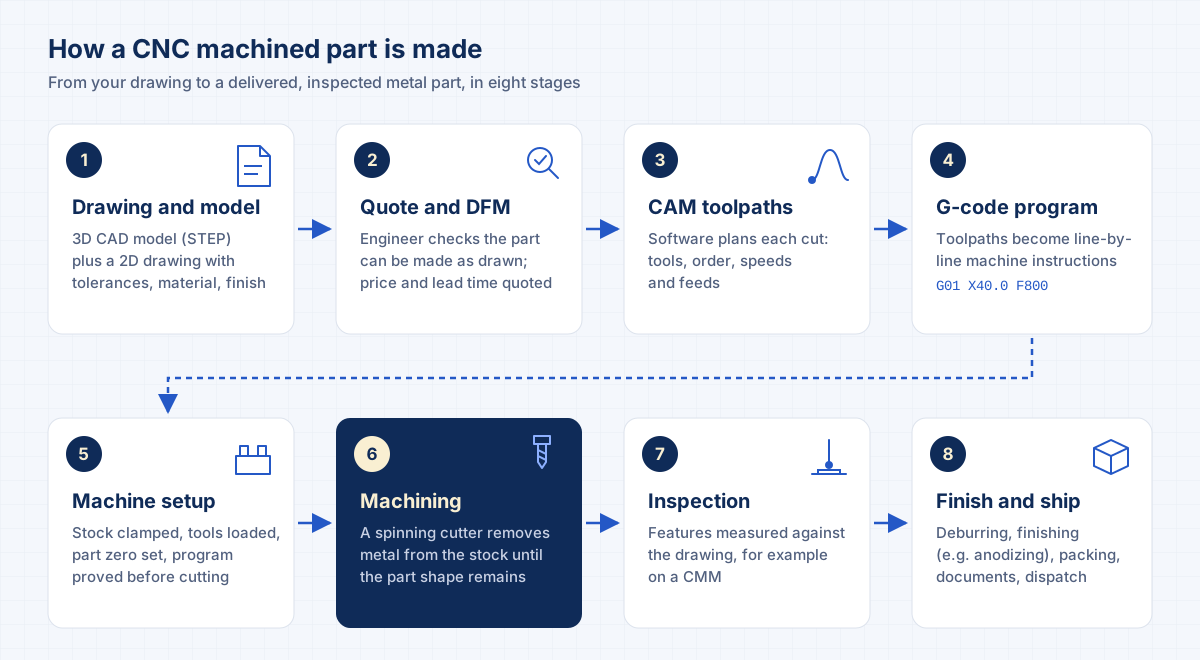
- Drawing and 3D model
You supply a 3D CAD model, usually a STEP file, and a 2D drawing. The model gives the shape. The drawing gives what the model can't: tolerances, material grade, surface finish, threads and notes.
- Quote and DFM review
An engineer checks that the part can be made as drawn. This is design for manufacturing (DFM). They flag features that add cost, such as deep narrow pockets or sharp internal corners, then quote a price and lead time.
- CAM programming
A programmer imports the model into CAM (computer-aided manufacturing) software. They choose the tools, the order of operations, and the cutting speeds and feeds. The software calculates the toolpaths.
- G-code
The CAM software converts the toolpaths into G-code, the line-by-line instruction language the machine controller reads. Each line is a command such as a move, a speed or a tool change.
- Machine setup
The operator clamps the stock in a vise or fixture, loads the tools, and sets the part zero (the reference point the program measures from). The program is usually checked in simulation or with a careful first run.
- Machining
The machine runs the program. A spinning cutter removes metal in passes, roughing first to take off bulk material, then finishing to reach final size and surface. Parts with features on several faces may need more than one setup.
- Inspection
Critical features are measured against the drawing. That can be hand gauges and micrometers, or a coordinate measuring machine (CMM) for complex geometry and tight tolerances.
- Finishing and shipping
Sharp edges are deburred. Finishes such as bead blasting or anodizing are applied if specified. Parts are packed with their inspection documents and dispatched.
What G-code actually looks like
G-code is standardized internationally as ISO 6983-1, which defines the program format for numerically controlled machines (ISO 6983-1). In practice, each controller brand adds its own extensions, which is why programs are posted (translated) for a specific machine.
A few lines of a typical program read like this:
G21            (units: millimeters)
G90            (absolute positioning)
T3 M06         (load tool 3)
S8000 M03      (spindle on, 8,000 rpm, clockwise)
G00 X0 Y0 Z5   (rapid move to start, 5 mm above the part)
G01 Z-2 F300   (feed down 2 mm at 300 mm per minute)
G01 X40 F800   (cut a straight line to X40)
You’ll never need to write G-code to buy a part. It helps to know it exists, because it explains why the same model can be quoted differently by two shops: the programming, tooling and setup choices are where shops differ.
Milling, turning and cutting: the main CNC processes
“CNC machining” is an umbrella term. The main processes differ in what spins and how the material is held.
| Process | What moves | Typical parts | Best for |
|---|---|---|---|
| CNC milling | A rotating cutter moves over a stationary part | Plates, brackets, housings, manifold blocks, pockets and slots | Prismatic parts with flat faces and features on several sides |
| CNC turning | The part rotates while a stationary tool cuts it | Shafts, pins, bushings, round fittings | Parts that are mostly round (rotationally symmetrical) |
| Laser cutting | A focused laser beam cuts a profile through sheet or plate | Flat profiles, brackets, plates with hole patterns | 2D shapes from sheet stock |
| 5-axis machining | A cutter moves in X, Y, Z plus two rotary axes | Angled features, complex housings, impellers | Parts with features on many faces or compound angles |
Many parts combine processes. A turned shaft may need milled flats; a milled block may need a precision bore.
Maketeq covers both: CNC and VMC (vertical machining center) machining, CNC milling, CNC turning, precision machining and 5-axis machining, plus sheet metal laser cutting and bending, in metals, plastics and other materials on request. We don’t offer 3D printing.
3-axis, 3+2 and 5-axis machining
The number of axes describes how many directions the machine can move the tool relative to the part.
- 3-axis machines move in X, Y and Z. The tool always points straight down, so each face that needs features means another setup: the part is unclamped, turned and clamped again.
- 3+2 machines add two rotary axes that tilt the part to a fixed angle, then lock while a 3-axis program cuts. It’s a cheaper route to reaching five sides of a part.
- 5-axis machines move the tool along X, Y and Z plus two rotary axes at the same time. They can reach five sides of a part in a single setup, with only the face resting on the table out of reach.
| 3-axis | 3+2 | 5-axis | |
|---|---|---|---|
| Faces reached per setup | 1 | Up to 5 (at fixed angles) | Up to 5 (angles change while cutting) |
| Setups for a part with features on 4 faces | Usually 4 | Often 1 or 2 | Often 1 |
| Feature types | Pockets, holes and slots square to a face | Angled holes and faces | Compound angles, sculpted surfaces |
| Programming effort | Lowest | Moderate | Highest |
| Best for | Simple prismatic parts | Angled features on otherwise simple parts | Complex parts where fewer setups protect accuracy |
Why fewer setups matter
- Each re-clamp can shift the part slightly, so features machined in one setup stay truer to each other.
- Less handling means less time per part on multi-sided parts.
- Shorter tools can reach angled features, which reduces vibration and improves finish.
When 5-axis isn't worth it
- Simple plates and brackets gain nothing from extra axes.
- Programming and machine time cost more per hour.
- If every feature is square to one or two faces, a 3-axis setup is usually the lower-cost route.
Tolerances: what “precise” means on a machined part
A tolerance is how far a dimension may vary from its nominal value and still be accepted. A bore drawn as Ø40.000 mm with a tolerance of ±0.05 mm passes anywhere from 39.95 mm to 40.05 mm.
Two standards shape how tolerances are written on drawings:
- ISO 2768 sets general tolerances for dimensions that don’t have their own tolerance on the drawing. Part 1 covers linear and angular dimensions in four classes: f (fine), m (medium), c (coarse) and v (very coarse) (ISO 2768-1). A note such as “ISO 2768-m” in the title block means every untoleranced dimension follows the medium class.
- ASME Y14.5 defines geometric dimensioning and tolerancing (GD&T): the symbols for flatness, position, perpendicularity and the rest, and how datums work. The current edition is Y14.5-2018 (ASME).
There’s no single tolerance that suits every part. What a feature can hold depends on its geometry, size, material, process and finish, so Maketeq works to the tolerances on your drawing and confirms them in the quote. These are the tightest values we can hold on suitable features, on request:
| Process | Down to, on request |
|---|---|
| CNC machining | ±0.005 mm (±0.0002") |
| CNC milling | ±0.005 mm (±0.0002") |
| 5-axis-machining | ±0.005 mm (±0.0002") |
| precision-machining | ±0.005 mm (±0.0002") |
| Sheet metal cutting | ±0.05 mm (±0.002") |
| Sheet metal bending | ±0.1 mm (±0.004") |
The practical rule: tighten only the features that need it. A bearing seat or a locating bore may need a tight tolerance; a clearance hole or an outside edge rarely does. Every tight tolerance adds machining passes, slower finishing and more inspection time.
Materials and finishes
CNC machining works with most metals. The right choice depends on strength, weight, corrosion resistance, conductivity, how the part will be finished, and cost.
- Aluminum is light, machines quickly and anodizes well, which makes it a common default for housings, brackets and plates.
- Stainless steel resists corrosion. It machines more slowly than aluminum, so parts take longer and cost more.
- Mild and tool steels are strong and economical, but need a coating or finish where rust matters.
- Titanium has a high strength-to-weight ratio and machines slowly.
- Brass and copper machine cleanly; copper is chosen for electrical and thermal conductivity.
These are the metals and alloy series Maketeq machines. Our guide to CNC machining materials explains what each series means and which finishes suit it, and each metal has its own page, such as aluminum CNC machining and titanium CNC machining:
- Aluminum1xxx, 2xxx, 3xxx, 4xxx, 5xxx, 6xxx, 7xxx, 8xxx
- Stainless steel200 series, 300 series, 400 series, PH grades
- Mild steel10xx, 11xx, 12xx
- Tool steelA series, D series, H series, M series, O series, S series, W series
- TitaniumGrades 1 to 4, Grade 5
- BrassC2xxxx, C3xxxx
- CopperC1xxxx
Plastics and other materials on request. The exact grade is confirmed in your quote.
A finish changes the surface after machining. Some protect (anodizing, powder coating, passivation, plating), some change appearance (bead blasting, brushing), and “as-machined” leaves the tool marks from cutting. Finishes available on Maketeq parts:
- As-machined
- Bead blasting
- Anodizing Type II
- Anodizing Type III (hard anodizing)
- Powder coating
- Brushing
- Passivation
- Electroplating (nickel, chrome, zinc)
- Painting
Specify the finish on the drawing, including color and type (for example, anodizing Type II, black). Coatings add thickness, so a finished bore can end up smaller than the machined bore unless the drawing says whether the dimension applies before or after finishing.
How machined parts are checked
Inspection answers one question: does the part match the drawing?
Simple features are measured with calipers, micrometers, bore gauges and thread gauges. Complex parts and tight tolerances usually go to a coordinate measuring machine (CMM). A CMM is a computer-controlled device that uses a probe to take measurements on a part’s surface, typically one point at a time (NIST). The software compares those points with the nominal geometry and reports each feature as a pass or fail.
Other documents can travel with the parts. A material certificate (often called a mill certificate) traces the metal to the batch it came from, with its chemistry and mechanical properties. A DFM report records design feedback given before production.
Every Maketeq order includes these documents. A CMM inspection report and DFM analysis are available on request. Read how Maketeq checks quality.
- Standard QC inspection
- Material certification (mill certs)
- ISO 9001 documentation
CNC machining vs 3D printing
Both make parts from a digital model, but they solve different problems.
| CNC machining | 3D printing (metal and plastic) | |
|---|---|---|
| How it works | Removes material from solid stock | Builds the part up layer by layer |
| Material behavior | Same as the wrought bar or plate it was cut from | Depends on the printing process and orientation |
| Geometry | Limited by tool access: internal corners have a radius, deep narrow features are hard | Can make internal channels and shapes a cutter can’t reach |
| Tolerances and surface | Tight tolerances and smooth machined surfaces are routine | Usually needs machining afterwards for tight fits |
| Best for | Functional metal parts, fits, sealing faces, production batches | Complex internal geometry, early form-and-fit prototypes |
What drives the cost of a machined part
Machining price isn’t set per kilogram or per part. It’s built from the time and resources each stage uses, so it helps to know which choices move it.
- Programming and setup. CAM programming, fixturing and proving the first part are paid once per job. On a single part they’re a large share of the price; across a batch they’re spread thin.
- Machine time. Every pass the cutter makes costs time. More material to remove, harder metals, deeper pockets and more setups all add minutes per part.
- Tolerances and finish. Tight tolerances need extra finishing passes and more measuring. A fine surface finish needs slower, lighter cuts.
- Material. The stock itself, plus how easily it machines. A tough alloy can cost more in cutting time than in raw material.
- Finishing and documents. Anodizing, plating or coating adds a separate process step, and some inspection reports take real measuring time.
- Quantity. Because setup is shared across the batch, ordering 50 parts instead of 5 usually lowers the price of each one.
The cheapest drawing is the one that states exactly what the part needs and nothing more. That’s the purpose of the DFM review: to catch the features that cost more than they’re worth before the part is programmed.
Common mistakes when ordering machined parts
These come up again and again when drawings reach a machine shop, and each one costs time or money.
- Model and drawing don’t match. The programmer has to stop and ask which is right.
- Tight tolerances on every dimension. It multiplies machining and inspection time for no functional gain.
- Sharp internal corners. A rotating cutter always leaves a radius. Allow one, and say what size is acceptable.
- No material grade. “Aluminum” or “stainless” isn’t enough; the grade changes strength, machinability and price.
- Finish not specified, or its thickness ignored. Coatings change dimensions on bores and fits.
- Threads not called out. Show thread size and pitch (for example, M6 x 1.0) and depth on the drawing, not just a hole in the model. See how to call out thread classes and reliefs.
- Quantity missing. Setup cost is shared across the batch, so the quantity changes the price per part.
What to send when you order a CNC machined part
This checklist covers what a shop needs to quote accurately the first time.
- 3D model: STEP (.stp or .step) is the safest universal format. Maketeq accepts STEP, IGES, DXF, DWG and PDF drawings, up to 5 MB per file.
- 2D drawing (PDF): dimensions, tolerances, a general tolerance note, GD&T where needed, and the revision letter.
- Material and grade: for example, 6061-T6 aluminum or 316 stainless steel.
- Finish: type, color, and whether dimensions apply before or after finishing.
- Threads: size, pitch, depth, and whether they’re tapped or thread-milled if it matters.
- Quantity: including any expected repeat orders.
- Inspection and documents: which features are critical, and which reports you need.
- Delivery address: so shipping and customs paperwork can be planned.
When you’re ready, you can upload a drawing for a quote. Maketeq confirms the lead time on every quote and usually ships by DHL or FedEx, with customs paperwork handled where required. For typical parts by sector, see the industries we supply.
Questions buyers ask about CNC machining
What does CNC stand for? Computer numerical control: a computer reads a program and drives the machine’s axes.
Is CNC machining only for large quantities? No. It’s used for single prototypes and for production batches. Setup and programming are a fixed cost per job, so the price per part falls as the quantity rises.
How accurate is CNC machining? It depends on the part: geometry, size, material, process and finish all set what a feature can hold, so there’s no standard tolerance that applies to every part. Maketeq works to the tolerances on your drawing and confirms them in the quote, down to ±0.005 mm (±0.0002”) on suitable machined features, on request.
What’s the difference between CNC milling and turning? In milling, the cutter spins and the part stays still. In turning, the part spins and the tool stays still. Milling suits flat-sided parts; turning suits round ones.
What files do I need? A 3D model (STEP is ideal) and a PDF drawing with tolerances, material and finish.
Sources
- National Inventors Hall of Fame: John T. Parsons
- ISO: ISO 6983-1, NC program format
- ISO: ISO 2768-1, general tolerances
- ASME: Y14.5-2018, dimensioning and tolerancing
- NIST: Coordinate measuring machine